
Location assignment is what turns an Agent from a machine that makes a noise into a device that knows where it is. Without it an Agent still receives whole-organisation alerts, but nothing scoped to a building or floor, and it can never be given a room-specific route.
Before you start
Have these ready.
- An enrolled, connected Agent.
- A site structure with the building, floor and room already created.
- A MassComs admin sign-in for the Setup window — the Agent asks for it again when you reconfigure.
- 01
Open Reconfigure from the tray icon
On the device, right-click (Mac: click) the MassComs tray icon and choose Reconfigure…. Sign in with your admin email and password; the Setup window then shows the location step. No reinstall is ever needed to move an Agent.
Agents deployed through Intune arrive with whatever Initial location their deployment token carried — often none. This is the same step for them.
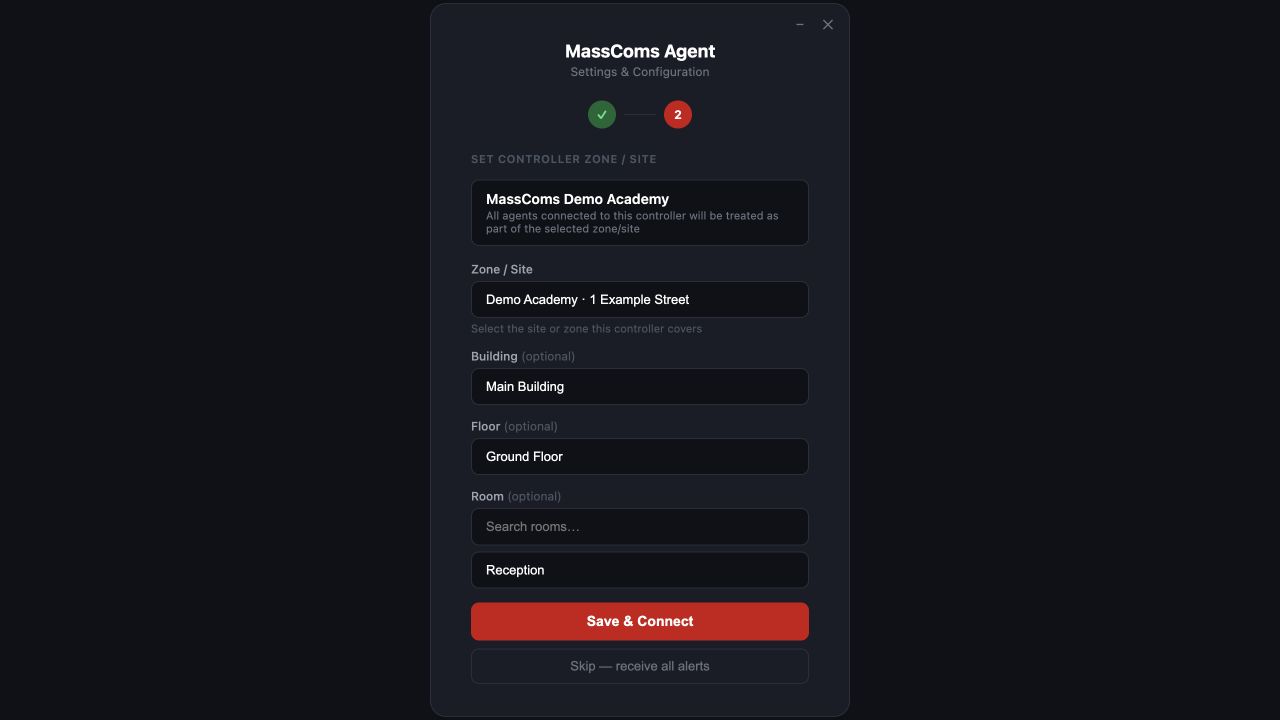
Agent location assignmentMassComs Agent Setup window with site, building, floor and room selection. - 02
Confirm the site
The site is detected automatically. If it is wrong, click Change site and pick the site this machine is physically at. If the site is missing, the structure has not been created — go to Sites & Zones first.
— No specific zone/site (all-org alerts) — means exactly that: this Agent will hear whole-organisation incidents only.
- 03
Choose building, floor, room and space
Work down the hierarchy. Building and floor decide which scoped incidents reach this Agent; the room (searchable) is what the route calculation uses; space is the finer subdivision where you have one. Click Save & Connect.
If the room list is empty for a floor, that floor's rooms have not been created — usually because the floorplan has not been traced yet. You can trace first and assign after, or create the room by hand.
Confirm it workedAgent Devices on the dashboard shows the same location in the Location column rather than org-wide. The change is saved to the cloud the moment you click Save & Connect.
- 04
Place it on the floorplan
Room assignment tells MassComs which room the Agent is in. Placing it on the floorplan tells MassComs where in the room, which is what the map overlay and device audit views use.
See Place devices on the floorplan.
- 05
Confirm the room is in a zone
An Agent in a room that belongs to no zone will not receive zone-scoped incidents. Check the room's zone membership in the floorplan builder.
This is the quiet failure: the Agent is connected, assigned and visible, and still receives nothing, because its room is not in the zone you are targeting.
- 06
Test with a targeted TEST incident
Trigger a TEST incident scoped to that room's zone and confirm the Agent responds while you are standing at it.
Troubleshooting
When it does not go to plan.
| Symptom | Usual cause | Fix |
|---|---|---|
| The room list is empty. | No rooms exist for that floor. | Trace the floorplan, which creates rooms, or add the room by hand in Sites. |
| Agent Devices still shows org-wide. | Save & Connect was not clicked, or Skip — receive all alerts was chosen. | Reconfigure… again and finish with Save & Connect. |
| The Agent receives organisation-wide incidents but not building- or floor-scoped ones. | It has no building or floor, or its room is not in the zone being targeted. | Set the building and floor in Reconfigure…, and check the room's zone membership in the floorplan builder. |
Good to know
Small details that prevent big confusion.
- Location is per device, not per user. Whoever signs in, the Agent is still in that room.
- A deployment token can carry an Initial location, which places a whole Intune batch at once — see Deploy Agents at scale.
- Re-check assignments after a re-trace — new room records are not the same records as the ones you assigned to.
- If machines move between rooms regularly, that is worth solving with a naming convention rather than repeated reassignment.
Was this guide clear?